
Check a Rent Estimate with Van to Vault’s Free Comp Guide
A starting number deserves a closer look
Before you set an asking price, check a rent estimate against nearby listings. A property down the street may include features your rental lacks. That difference matters when you compare prices.
Van to Vault’s Free Rentometer Alternative: Comp Your Own Rent in 10 Minutes explains a practical manual check. Its guide walks through choosing five rentals, comparing their features, and reviewing the result.
Use RentEst for a starting estimate and nearby listings. Then use Van to Vault’s guide to examine the properties behind your decision.
What Van to Vault’s guide adds
The guide gives you a repeatable way to review rental comparisons. These comparisons, often called “comps,” are similar properties you use to judge an asking price.
Van to Vault suggests matching bedroom counts and looking for similar sizes. It starts with listings from the last 60 days, within roughly a mile. Its worksheet helps organize the rents and property differences.
Those filters give you a starting search. Check whether the results actually resemble your property. A nearby furnished rental may serve different tenants from your unfurnished unit.
1. Check a rent estimate by inspecting the listings
Start with your property’s address, bedroom count, bathroom count, and type. Record the estimate before reviewing individual comparisons.
RentEst’s comparable listings table shows the details you can inspect:
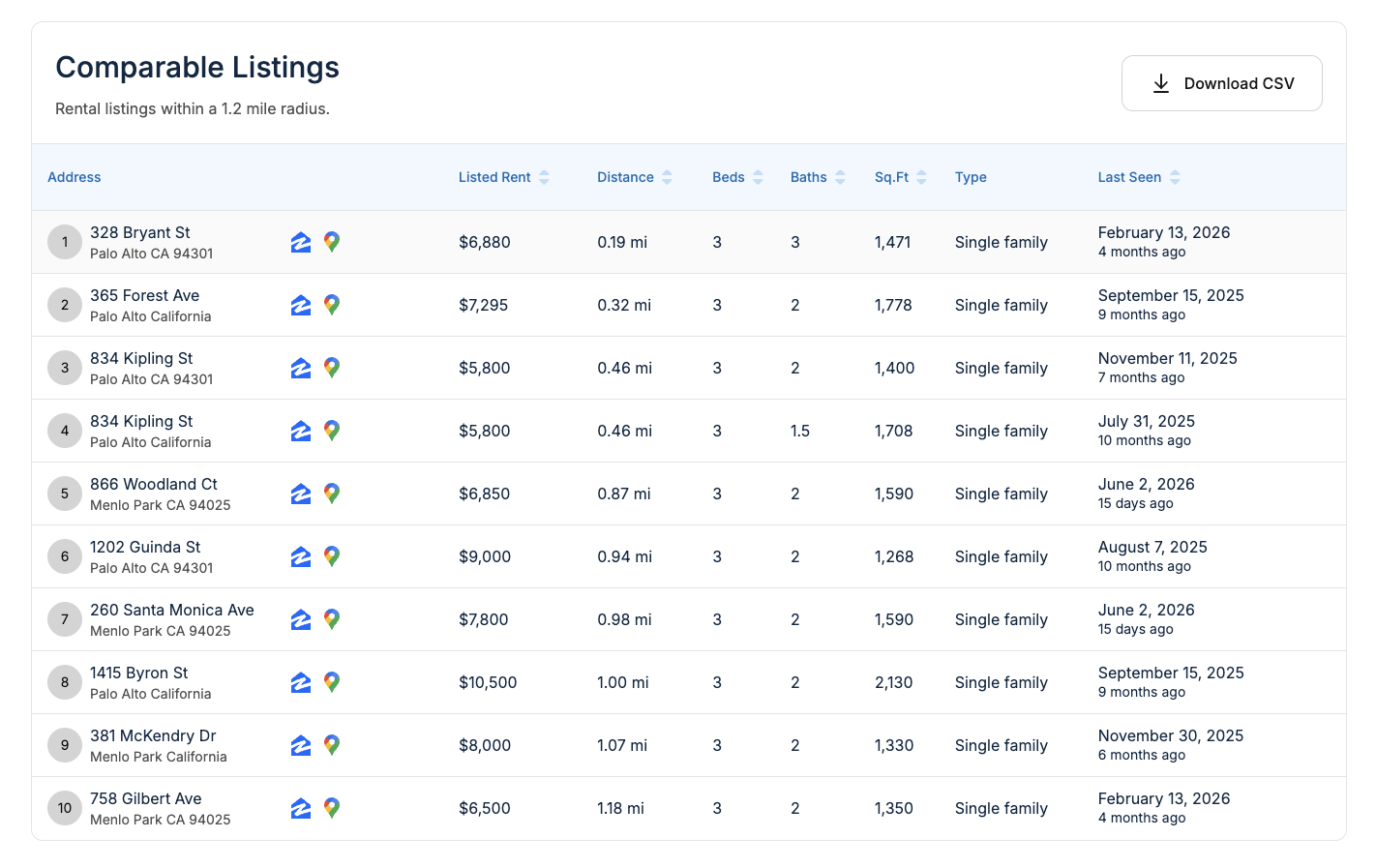
This saved screenshot shows the review process, not current market prices. For example, 328 Bryant St shows three bathrooms. Several other entries show two.
It also shows two entries for 834 Kipling St with different property details. Investigate that mismatch before counting them as separate comparisons. A repeated address could represent different units or records of the same rental.
Review these fields before you select your five:
- Property type: Compare a house with houses, or an apartment with similar apartments.
- Bedrooms and bathrooms: Check both counts against your unit.
- Size: Investigate large differences in floor area.
- Location: Check neighborhood boundaries and access, alongside distance.
- Recency: Open the source listing to check availability and advertised terms.
A last-seen date records an observation. It does not prove when a lease started or what someone paid.
2. Keep five useful comparisons
Choose five distinct rentals that a tenant might consider alongside yours. Keep a short note explaining each selection.
Do not force the count when the matches are weak. If you find only three convincing comparisons, record that limitation. Expand your search carefully and explain any tradeoffs.
Check the full advertisement for costs and features beyond base rent:
- Utilities: Identify which bills the advertised rent includes.
- Parking: Note whether a space costs extra.
- Laundry: Distinguish shared facilities from machines inside the unit.
- Condition: Compare photos of kitchens, bathrooms, and living areas.
- Lease terms: Record furnished status, lease length, and advertised discounts.
3. Explain differences before changing the number
A nicer kitchen does not justify the same adjustment in every neighborhood. Look for local evidence before assigning a dollar value to a feature.
If you cannot support an adjustment, describe the difference instead. You can exclude a poor match without inventing a precise correction.
Worked example: five asking rents
These figures are hypothetical teaching examples, not live listings or a RentEst result. Assume you have already reviewed five similar rentals with comparable lease terms.
| Comparison | Monthly asking rent |
|---|---|
| Rental A | $1,950 |
| Rental B | $2,000 |
| Rental C | $2,050 |
| Rental D | $2,100 |
| Rental E | $2,300 |
The middle value, or median, is $2,050. The average is $2,080. Rental E pulls the average upward.
Now suppose your automated estimate was $2,200. That sits $150 above the median of your selected comparisons.
That gap gives you something specific to investigate. Does your property offer an advantage? Did your search miss better matches? Does Rental E include something the others lack?
4. Choose a range you can explain
In the example, four asking rents fall between $1,950 and $2,100. That cluster gives you a range to investigate. It does not establish a final price.
Asking rents show what landlords request. They do not confirm signed lease amounts. Check whether the listings remain available and whether their prices have changed.
Write down your proposed range, the strongest comparisons, and any unresolved differences. Revisit the range when fresh listings or actual applicant feedback give you better evidence.
The takeaway
RentEst provides a starting number and listings to inspect. Van to Vault’s free rent-comp guide provides a manual review process you can follow alongside it.
Choose a rent you can explain through comparable properties and clear notes. Keep the evidence behind your decision as visible as the final number.
Get your starting rent estimate on RentEst.